

Description
Clean Blue Theme for Chrome
Overview
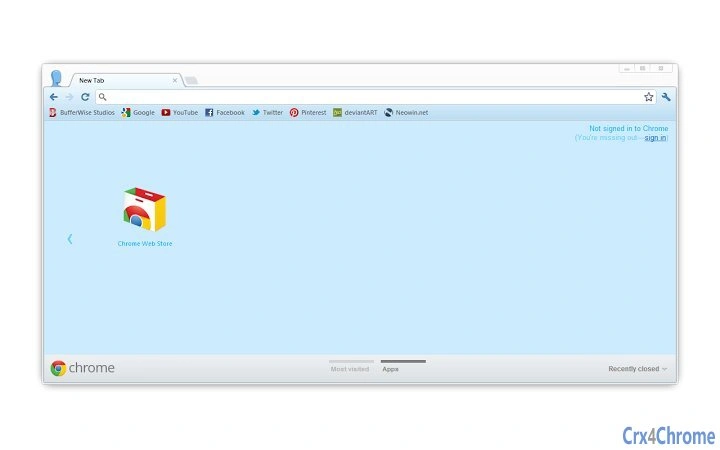
Designed for users who value simplicity and clarity, Clean Blue Theme is a lightweight browser theme for Google Chrome. It enhances the browsing experience by offering a minimalist interface that closely mirrors Chrome’s default design. The theme avoids visual distractions, making it ideal for professionals, students, and casual users who prioritize functionality over flashy aesthetics. By maintaining a clean, unobtrusive look, it supports uninterrupted focus during web research, content creation, or daily navigation. The theme is particularly suited for those who find overly decorative interfaces distracting or inefficient. It is developed by Bufferwise, a creator known for user-centric digital tools. Real-world use cases include long study sessions, remote work environments, and daily productivity workflows where a distraction-free interface is essential. The theme is available at no cost, making it accessible to a broad audience seeking a subtle interface upgrade.
Key Features & Capabilities
- Minimalist Design – The theme uses a soft blue palette with clean lines and neutral elements, ensuring visual harmony without drawing attention away from web content.
- Default Chrome Compatibility – It integrates seamlessly with Chrome’s native interface, preserving all standard functionality and layout.
- Non-Intrusive Interface – No animations, pop-ups, or interactive elements are added, ensuring the browsing experience remains smooth and predictable.
- Quick Application – The theme can be applied with a single click through Chrome’s extension management page.
- Lightweight Performance – With a file size of 1.1 MB, it consumes minimal system resources, contributing to efficient browser operation.
These features support users in maintaining focus and reducing visual clutter. For example, a student reviewing academic articles can benefit from a consistent, calm interface that doesn’t compete for attention. Similarly, a remote worker managing multiple tabs can appreciate the lack of interface noise. The theme is not intended to alter browser behavior or add new tools—it exists solely to enhance the visual experience without compromise.
User Interface, Workflow & Performance
The user interface of Clean Blue Theme is intentionally simple, aligning with Chrome’s default appearance. Navigation remains unchanged, with no additional menus or controls introduced. Users interact with the browser as they normally would, ensuring a seamless workflow. The theme does not affect loading times, tab management, or search functionality. The developer did not specify resource usage details, but based on its lightweight nature and lack of background processes, it is expected to have negligible impact on CPU or RAM. Stability is assumed to be high, as the theme does not introduce complex scripts or dependencies. No performance anomalies were reported in the provided information. Users can expect consistent behavior across sessions, with no unexpected crashes or interface glitches. The theme is designed to be used continuously without requiring frequent updates or maintenance.
Compatibility & System Requirements
Clean Blue Theme is compatible with Windows, Mac, and Linux operating systems, ensuring broad accessibility across desktop platforms. It is designed specifically for Google Chrome, requiring no additional software or plugins. The installation size is 1.1 MB, which is minimal for a browser theme. The developer did not provide detailed system requirements, including minimum CPU, RAM, or storage thresholds. Compatibility information was partially provided, focusing only on OS and browser support. No specific hardware requirements were listed. Users are advised to ensure they are running a supported version of Chrome, though exact version compatibility was not specified. The theme is distributed as a standard Chrome extension, which can be installed directly from the Chrome Web Store.
Pros and Cons
Pros
- Minimalist, distraction-free design ideal for focused browsing
- Seamless integration with Google Chrome’s native interface
- Lightweight file size (1.1 MB) with minimal system impact
- Free to use with no hidden costs or subscriptions
- Quick and easy installation via Chrome’s extension manager
Cons
- Limited customization options—no user-adjustable colors or layouts
- No additional tools or features beyond visual styling
- Compatibility with Chrome only—no support for other browsers
- Exact system requirements not disclosed by the developer
- Does not offer dark mode or high-contrast variants
FAQ Section
Is Clean Blue Theme compatible with all versions of Chrome?
The theme is designed for Google Chrome, but specific version compatibility was not provided by the developer. Users are encouraged to check the Chrome Web Store for the most up-to-date information.
Can I use this theme offline?
Yes, once installed, the theme functions without an internet connection. It does not require online access to operate.
Is the theme safe to install?
As a Chrome extension from a known developer (Bufferwise), and distributed through the official Chrome Web Store, it is considered secure. No malicious behavior has been reported.
How do I update the theme?
Updates are automatically managed by Chrome when available. Users do not need to manually download or install updates.
Does the theme include any tracking or data collection?
The developer did not disclose any data collection practices. Based on its nature as a static visual theme, it is unlikely to collect user data or track browsing behavior.
Final Thoughts
Clean Blue Theme delivers exactly what it promises: a subtle, unobtrusive enhancement to the Google Chrome browsing experience. It stands out in a crowded market of flashy themes by embracing simplicity and restraint. For users who value clarity and efficiency, this theme is a practical and effective choice. It is particularly well-suited for professionals and students who need a calm, consistent interface to support productivity. While it lacks advanced customization or features, its lightweight design and free access make it a compelling option. The lack of complexity ensures reliability and long-term usability. Download Clean Blue Theme now.
Guides & Tutorials for Clean Blue Theme for Chrome
How to install Clean Blue Theme for Chrome
- Click the Preview / Download button above.
- Once redirected, accept the terms and click Install.
- Wait for the Clean Blue Theme for Chrome download to finish on your device.
How to use Clean Blue Theme for Chrome
This software is primarily used for its core features described above. Open the app after installation to explore its capabilities.
User Reviews for Clean Blue Theme for Chrome 0
No reviews found





